Cashout · Finance · iPhone

Know what you actually walk with tonight

Three numbers at the end of the shift — net sales, cash tips, card tips. Cashout applies your house's tip out rules, shows the split role by role, and files the night away so the whole year adds up later.

  • Six ways to write a tip out rule, in your house's words
  • Works offline. No account, no ads, no server.
  • This week and last week stay free forever
Cashout is coming to the App Store

Free to use. Pro is $19.99 a year after a 7-day trial.

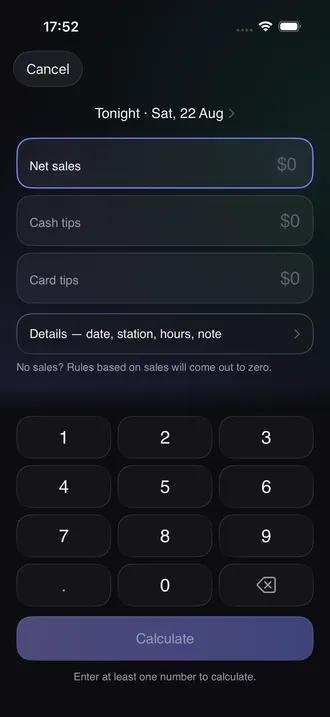
Cashout close-out screen with fields for net sales, cash tips and card tips above a number pad
Three numbers and a button
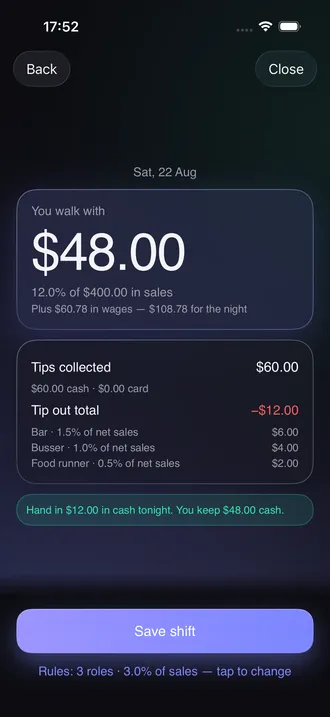
Result screen showing take-home of forty-eight dollars, the tip out split by role, and a cash handover line
What you walk with, and why
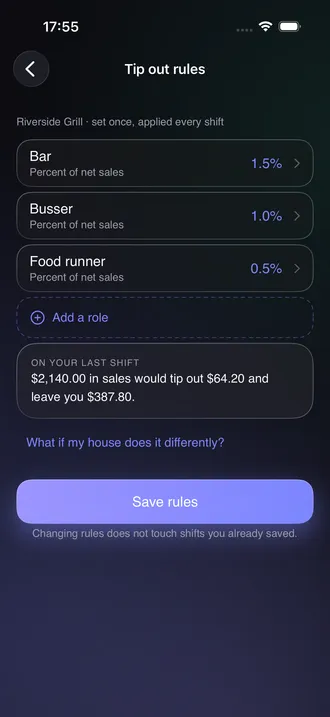
Tip out rules screen listing bar, busser and food runner with their percentages of net sales
Set once, applied every shift
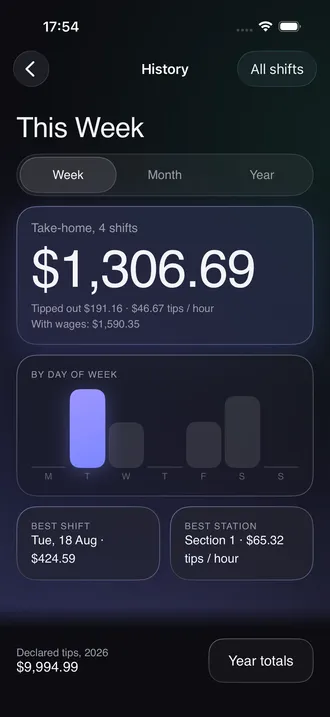
History screen with weekly take-home, a bar chart by day of week, best shift and best station
The week, without a spreadsheet
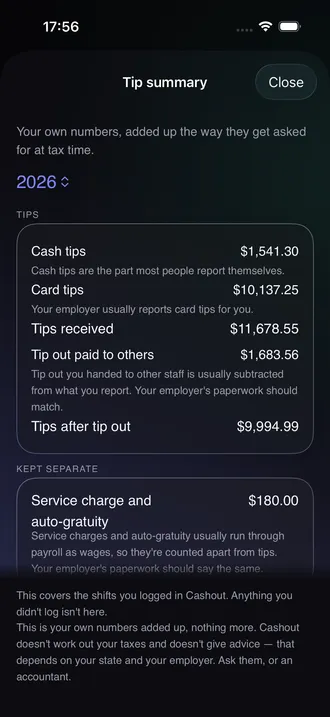
Tip summary screen listing cash tips, card tips, tip out paid to others and tips after tip out for the year
Your own numbers, added up

The arithmetic is easy. Having it in March is not.

Most servers can do the tip out in their head at the bar. The part that breaks is everything after: the slip goes in an apron pocket, the pocket goes through the wash, and by the time anyone asks what a month looked like there is nothing left but a guess. The apps built for this have their own failure — read the reviews of the big ones and the most common one-star story is data loss after an update, a logout, or a new phone. Cashout is built the other way around: the number is the easy part, the record is the product. Everything lives on the phone, a backup file goes to your iCloud Drive on its own, and nothing is ever deleted to make you pay.

What it does

Six rule types, one screen, and a log that stays put

Your house's rules, entered once

Bar 1.5% of net sales, busser 1%, runner 0.5% — or 8% to the bar off your tips, or a flat $20 to the host. Six rule types cover percent of net, bar or food sales, percent of all tips or card tips, and fixed dollars. Add as many roles as your house has.

Cash and card kept apart

Tip out usually comes out of the cash in your pocket while the card tips arrive on payday. Cashout tracks both and tells you when the cash on hand will not cover what you owe the bar tonight.

A shift log you can hand to anyone

Every saved shift keeps a frozen snapshot of the split — the roles, the percentages and the dollars as they were that night. Changing your rules later never rewrites a shift you already saved.

One field for the nights that go sideways

Half a shift behind the bar, no runner at lunch, the manager rounded it off — type what you actually handed over and the shift records that instead of the calculated figure.

Numbers added up the way they get asked for

Cash tips, card tips, tip out paid to others, tips after tip out, service charges kept separate, hours, and a breakdown by job. Cashout adds up your own numbers and stops there — it does not work out taxes and does not give advice.

Backups are not a paid feature

Automatic backup to your iCloud Drive, a manual backup file you can move yourself, and restore — all free. Apps in this category charge for backups. Keeping your own records safe is not a product.

How a shift goes

Three taps at the end of the night

  1. 01

    Set the rules once

    Name each role your house tips out and pick what the percentage comes off. Takes about a minute on the first run, and most people never open the screen again.

  2. 02

    Close out in three numbers

    Net sales, cash tips, card tips. Date, station, hours and a note are optional and live one tap deeper.

  3. 03

    See the night, then forget about it

    The split, the take-home, and how much cash to hand in. Save, and it joins the week, the month and the year.

What costs money

The calculator is free. The archive is the paid part.

Free, with no shift limit

  • The tip out calculation itself, on any number of shifts
  • All six rule types, as many roles as you need
  • Saving shifts — no cap, no limit on how many you keep
  • This week and last week in full, with the chart and the stats
  • Automatic iCloud Drive backup, manual backup, restore and delete
  • Manual override, service charges, hourly wage, receiving a tip out

Pro · $19.99 a year

  • History past the last two weeks — month, year, and every past year
  • The tip summary: totals by year, by month and by job
  • Export to CSV
  • A second and third job, each with its own rules

7-day trial. Nothing is deleted when a subscription ends — the log collapses back to the free window and the calculator keeps working.

FAQ

Questions people ask first

What happens to my shifts when I get a new phone?

Cashout writes a small backup file into your own iCloud Drive automatically, and the new phone reads it on first launch. You can also save the file yourself and move it however you like. Data loss after an update or a phone swap is the single most common complaint in reviews of the apps in this category, which is why backup and restore are free here rather than a paid extra.

Can I fix a shift after I saved it?

Yes. Open the shift in the log and edit any field — sales, tips, hours, date, note. The saved split updates with it, and there is no duplicate left behind. Several competing apps write a shift once and never let you correct it, which turns one typo into a wrong year.

My restaurant pools tips instead of tipping out. Is this useless to me?

The tip out part is, but the log is not. Leave the rules list empty and Cashout records what you were handed each night, your hours, your sales, and adds it up by week, month and year. It does not calculate your share of a pool split by hours or points — those numbers belong to the whole team, not your phone.

Which sales number do I enter, gross or net?

Whichever one your house tips out on, entered exactly as your cash-out slip prints it. Cashout does not adjust for discounts, comps or voids — it takes the figure you give it. Houses differ on this and the difference is real money, so it is worth asking a manager which line on the slip the percentages come off.

What if my house does tip out in a way the six rule types do not cover?

Every shift has an override field: type what you actually handed over and the shift stores that number with a mark showing it was entered by hand. That covers split stations, a host who only gets tipped out on weekends, a manager who rounds, and anything else a rules list cannot predict.

Does Cashout tell me anything about taxes?

No. It adds up your own numbers — tips received, tip out paid to others, tips after tip out, service charges kept separate — and shows them by month, year and job. It does not calculate tax, does not mention rates, and does not give advice. That part belongs to your employer or an accountant.

Are there ads?

None, in the free version or the paid one. No banners, no interstitials, no prompt three times a session. The paid tier exists so the free one does not need advertising.

Does it need an account or an internet connection?

Neither. There is no sign-up, no password and no server holding your shifts. Everything is computed and stored on the phone. The iCloud Drive backup is a file in your own Drive folder, not a sync service run by us.

From the notebook

How tip out actually works out there

All articles

Tip out, take-home and a shift log that survives a new phone

Cashout runs on iOS 26.0 and later. No account, no network calls, nothing leaves the phone except the backup file you keep in your own iCloud Drive.

Cashout is coming to the App Store

Free to use. Pro is $19.99 a year after a 7-day trial.