Age you can see across the room
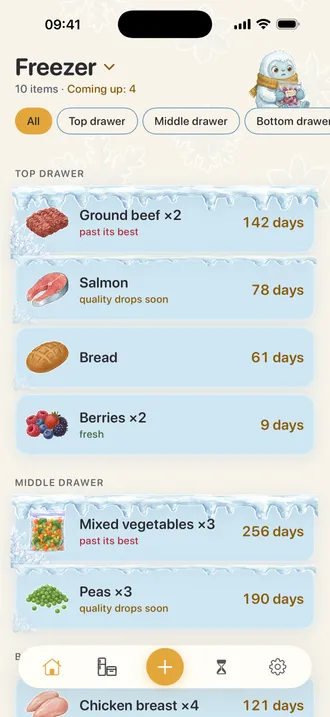
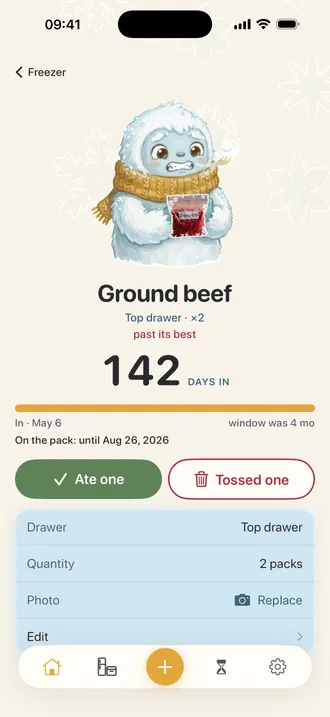
Four steps of frost, not a smooth gradient — clear, settled, frosted, deep. The number of days and a plain caption sit right next to it, so the list works just as well for someone who cannot make out the difference.
Frostlog · Food & Drink · iPhone
Two taps put a pack in the list. From then on the card slowly frosts over as the food ages, so the oldest things are the ones your eye lands on first — no dates to read, no badges to decode.
Free to use. Pro is $12.99 a year after a 3-day trial.
The chicken was for a Tuesday that never came. Eight months later it is behind the peas, under the bread, and the only way to find out what it is means unpacking the whole drawer onto the counter. Most freezer apps answer this with a spreadsheet: a list, an expiry date per row, and a badge that turns red. That works right up until the list has forty rows, and then it is another thing to read. Frostlog shows age the way the freezer itself does — old food is covered in frost. A pack four days in sits on clear glass. A pack past its window is buried in ice. The name stays at full contrast on both, because frost is never the only thing telling you something.
What it does
Four steps of frost, not a smooth gradient — clear, settled, frosted, deep. The number of days and a plain caption sit right next to it, so the list works just as well for someone who cannot make out the difference.
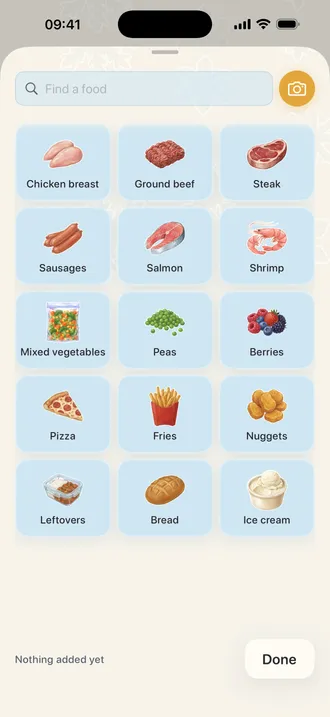
A grid of the fifteen things people actually freeze. Tap one and the pack is logged with today's date and its storage window already filled in. The grid stays open, so five bags of groceries take five taps and not five forms.
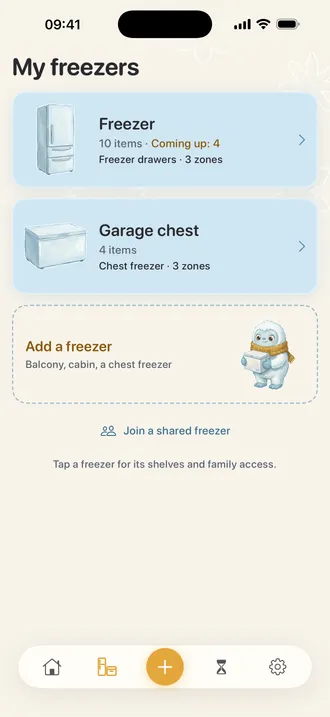
Six layouts — a compartment over the fridge, pull-out drawers, a French door, a side-by-side column, an upright cabinet, a chest with baskets. Pick the type, then say how many drawers or shelves yours has. The number is never assumed.
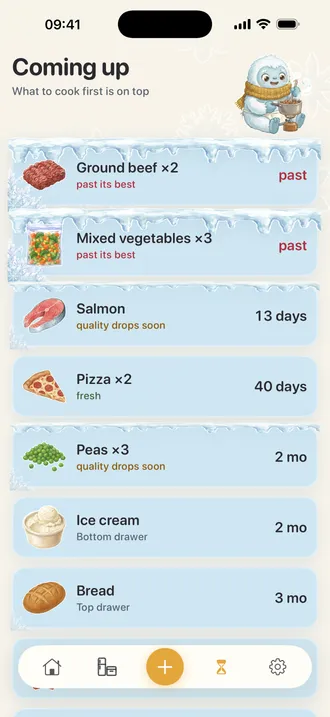
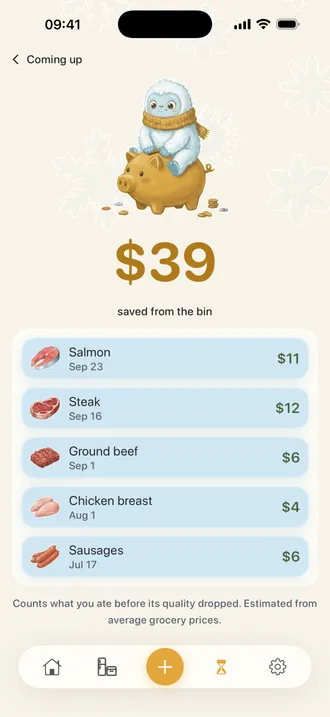
The packs past three quarters of their window, worst first, across every freezer you keep. Push one a week down the list if this is not the week for it.
Search reaches all 125 foods, not just the fifteen tiles on screen. Nothing there for elk ribs or your grandmother's dumplings? Type the name and it goes in with a six-month window you can change.
Share a freezer with the person you live with. What one of you takes out, the other sees. No accounts to make — it runs on the iCloud you both already have.
How it goes
The empty list is the add form. No welcome tour, no setup screen — the first pack goes in with one tap.
Asked after the first pack, not before, so the question means something. Skip it and everything works as one list.
Open the app before you plan the week. The oldest packs are the ones covered in ice, and they are already at the top.
What costs money
Free, with no limit on packs
Pro · $12.99 a year
3-day trial. Nothing is deleted when a subscription ends — your freezers, packs and dates stay exactly as they are, and the free list keeps working.
FAQ
No. Tap the tile and the window comes from the USDA FoodKeeper chart — nine months for chicken breast, four for ground beef, twelve for berries. You can change it on any pack, but you never have to. This is the main reason freezer lists get abandoned: entering a date per bag is fine for the first ten and unbearable by the fiftieth.
No, and that is deliberate. Read the reviews of apps in this category and the complaint is never that a scanner is missing — it is that the scanner does not recognise anything, because a bag of chicken thighs from the butcher has no barcode and a supermarket own-brand is not in any product database. Two taps beat a scanner that fails half the time.
No. Frozen food kept at 0°F stays safe indefinitely — the windows in Frostlog are about quality, not safety. A heavily frosted card means the texture and flavour have been going downhill for a while, not that anything is dangerous. The app says so on the card itself rather than leaving you to guess.
It arrives with you. Frostlog mirrors to your own iCloud, which means no account to create and no password to lose — if you are signed into iCloud, the new phone finds the list on first launch. With iCloud switched off the app works exactly the same, just on that phone alone.
Yes, with Pro. Each freezer keeps its own layout, its own shelves and its own list, and you switch between them from the title at the top. Eat This Week deliberately looks across all of them — food going off in the garage is exactly what you would otherwise miss.
Yes, with Pro. Share the freezer and what one of you takes out, the other sees. It runs over the iCloud you both already have, so there is no account for either of you to make. Sharing between your own devices is free — the paid part is sharing with another person.
Nothing. The shared freezer lives in the owner's iCloud storage, and a pack of food is a couple of hundred bytes. All they need is an Apple ID they are already signed into.
None, in the free version or the paid one. No banners, no interstitials, no prompt to rate the app three times a session. The paid tier exists so that the free one does not have to be paid for by advertising.

Frostlog runs on iOS 26.0 and later. No account and no server of ours. The list lives on your phone and, if you leave iCloud on, in your own iCloud account — where it comes back by itself on a new phone.
Download on the App StoreFree to use. Pro is $12.99 a year after a 3-day trial.