Vanity app icon

Vanity · Lifestyle · iPhone

Remember which cream it was. And whether it was worth it.

Vanity is a hand-painted diary for your skincare, makeup and perfume. Snap a jar, and it lands on the right shelf with its brand and name already read from the label.

  • Snap a photo: the jar is cut out and the label read
  • Holy grail, repurchase, meh, never again: a stamp, not stars
  • Nothing leaves your phone. No account, no server
Download on the App Store

Free for 35 products. Pro: $4.99 a month with a free week, or $47.99 a year.

A painted girl lying on a bean-bag chair with her phone and a jar of cream, the heroine of the Vanity app
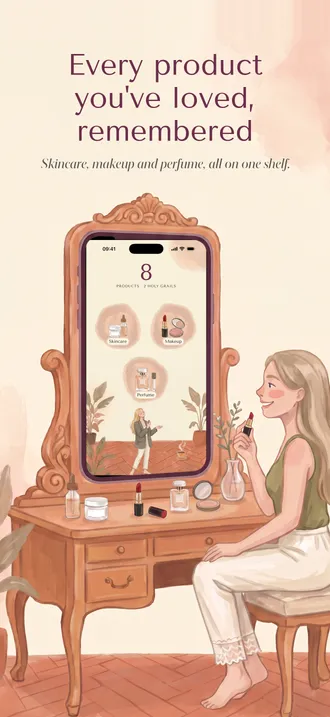
A painted girl at a vanity table whose mirror is a phone showing the Vanity home screen with skincare, makeup and perfume
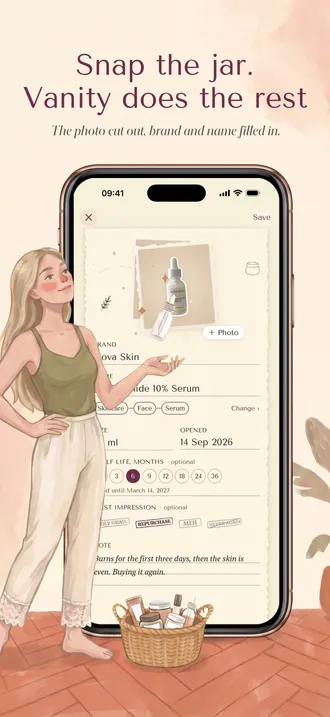
The girl tosses a serum bottle into a phone showing the add form with the product cut out and the label read
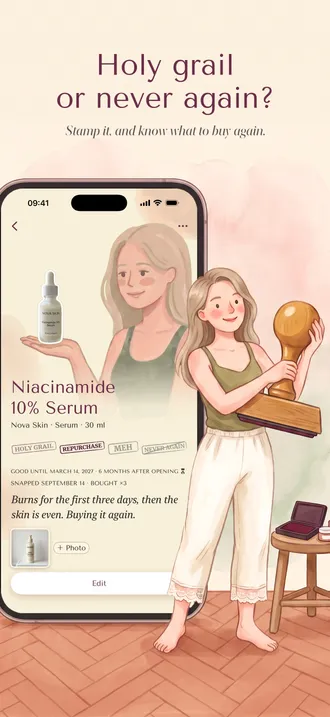
The girl holds a big wooden rubber stamp next to a product card with holy grail and repurchase stamps
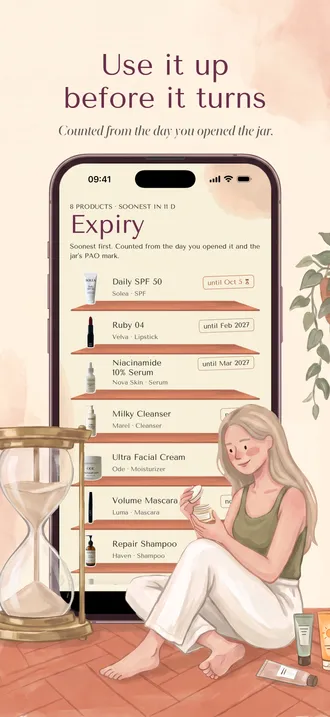
An hourglass beside a phone with the Expiry tab, listing products by the date they expire
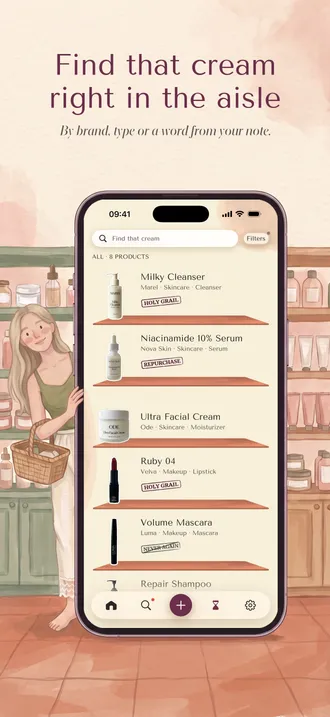
The girl with a shopping basket in a beauty shop aisle next to a phone showing the search list
Two friends on a rug looking at printed pages of a Vanity PDF export with product photos and stamps
The girl packs her cosmetics into a moving box next to a phone showing the backup and export screen

You have tried hundreds of products. You remember about six.

The serum that finally worked was a white bottle with a black cap, bought at an airport two winters ago. That is the whole memory. So you buy something that looks similar, it isn't the same, and the circle starts again. Notes apps turn into a wall of text, and beauty apps ask you to type everything and rate it with stars you will never read. Vanity starts from the photo, because the photo is the part you will recognise, and asks you for one word when you know: holy grail, or never again.

What it does

A photo in, a product on the shelf, a stamp when you know

Snap the jar. Vanity does the rest

Point the camera at a jar or a tube. Vanity cuts the product out of your bathroom, reads the brand, name and size from the label, and puts it on the right shelf. It all happens on your phone. Wrong guess? Tap and fix it.

Three rooms: skincare, makeup, perfume

Each has its own painted room, and inside it the groups you know: face, lips, eyes, hair, body, nails. Inside those, types like serum, SPF or mascara. Add your own type when the list is not enough.

Stamps, not stars

Holy grail. Repurchase. Meh. Never again. Four verdicts in the words you already use, pressed onto the product like a rubber stamp. A year later, 'never again' tells you more than three stars ever did.

Use it up before it turns

Note the day you opened a jar and the months printed on its lid. The hourglass tab lines up everything by what expires first, so the good cream gets finished instead of forgotten.

Find that cream right in the aisle

Search by brand, type or any word from your notes, and filter by stamp to see your holy grails at a glance. Bought it again? Vanity recognises the barcode and counts the repurchase.

Share it, or take it with you

Send a friend a pretty PDF of your vanity with photos, stamps and notes. Keep a full backup in one file and restore it on a new phone, photos included.

How it goes

A few minutes for the shelf, one stamp per verdict

  1. 01

    Snap what is on your shelf

    One product per photo, label facing you. Vanity cuts it out and reads the label while you reach for the next jar.

  2. 02

    Check the label, add a note

    Brand, name, size and type arrive filled in. Fix what needs fixing, and add a line in your own words if you already have an opinion.

  3. 03

    Stamp it when you know

    Holy grail or never again, whenever you are sure. Your holy grails collect themselves, ready for the next shop.

What costs money

Thirty-five products are free. Pro is for the rest.

Free, up to 35 products

  • Your first 35 products, with photos cut out and labels read
  • Every section, type, stamp, note and search, nothing locked
  • The Expiry tab and the barcode repurchase count
  • Everything you add stays yours, whatever you decide later

Pro · $47.99 a year

  • As many products as your shelf holds
  • iCloud sync between your own iPhones
  • A pretty PDF to share, and a full backup to keep or move
  • The same Pro on both plans: they differ only in length

The month starts with a free week; the year is charged on the day you buy it. Whatever you choose, everything you have added stays yours, and cancelling never removes a product, a photo or a stamp.

FAQ

Questions people ask first

Do I have to type the product name?

Usually not. The label is read on your phone, and the brand, name and size arrive already filled in. Brands are matched against a list of beauty brands that ships inside the app, so a stylised logo still comes out right. The name is a guess from the biggest words on the label and is sometimes wrong; tap the field and fix it. Nothing is saved until you tap Save.

Why is the photo cut out?

A shelf only looks like a shelf when products look like products, not like your bathroom sink. Vanity separates the jar from the background on your phone and stands it on the shelf, the way a shop photographs it. You can add more photos of the same product, for example the back of the box with the ingredients.

Why stamps and not star ratings?

Stars are easy to give and impossible to read back: a three from two years ago means nothing. The four stamps are the words people already use about products, and each one is a decision you can act on in the shop: buy it again, or never again.

What happens after 35 products?

Everything you added stays, with every stamp, note and photo, and search and the Expiry tab keep working. Only adding new products past 35 asks for Pro. Pro is $4.99 a month with a free first week, or $47.99 a year. Cancelling never removes anything you added.

Where are my photos and notes?

On your iPhone, in the app's own storage. With Pro you can switch on iCloud sync; then they are mirrored to the private area of your own iCloud account, which nobody else, us included, can read. There is no account with us and no server of ours.

How does the expiry date work?

Most jars carry a small open-jar symbol with a number, like 6M or 12M: the months the product lasts after opening. Pick that number and the day you opened it, and Vanity counts the date. The Expiry tab lists everything by what runs out first.

Can I move my vanity to a new phone?

Yes. With iCloud sync it comes back on its own. Without it, Back up & export makes one file with every product and photo; open it on the new phone with Restore from a backup, and the products come back in place.


From the notebook

How long products last, and how to keep track

All articles

A painted diary of every product you have tried, and what you thought of it

Vanity runs on iOS 26.0 and later. No account and no server of ours. Your photos and notes live on your iPhone and, with Pro, in your own iCloud, where they come back by themselves on a new phone.

Download on the App Store

Free for 35 products. Pro: $4.99 a month with a free week, or $47.99 a year.